Can I Ride Dance AI Video Generator

Create a viral Can I Ride dance AI meme video from one photo, then add your favorite audio.

Motion reference

Can I Ride

Reference Photo
1 Photo
Choose Quality50 credits
100% Watermark-Free·Commercial Use Included

Can I Ride AI Video Specifications

Specs at a Glance
  • Input Required:1 photo (JPG, PNG, WebP up to 10MB)
  • Mapping Slots:Solo Character Performance
  • Output Format:10s vertical 9/16 MP4 (480p / 720p)
  • Audio Integration:Silent MP4; add music on TikTok, Reels or in your editor
  • Processing Time:3 to 6 minutes (Cloud GPU motion-transfer, typically ~5 mins)
  • Watermark Policy:100% Watermark-free for all credit tiers

How to make a Can I Ride AI dance video

  1. 1

    Upload one photo

    Add a JPG, PNG or WebP photo of one person, up to 10MB. The dance reference is already included.

  2. 2

    Choose quality and generate

    Select 480p for 50 credits or 720p for 100 credits. Generate a 10-second performance following the Can I Ride reference.

  3. 3

    Preview and download

    Preview the movement, then download your watermark-free silent MP4. Add Can I Ride or another available licensed sound on TikTok, Reels or in your editor before posting.

Cultural Lore & Origin

What is the Can I Ride dance trend?

On this page, Can I Ride refers to the hallway dance shown in two linked TikTok posts by @minicaseoh6741. Both supplied screenshots list Can I Ride — SIDEPIECE & 95 South as the sound. The earlier post shows a mint polo and shorts; the later reference uses a yellow scout-style outfit, described as Russell in its caption. These examples document two performances, not a verified first-ever origin.

Choose a clear photo for the hallway dance

Use one sharp, well-lit photo of a single person, ideally showing their full body, face and limbs. Avoid group photos, covered faces and cropped feet. Your photo defines the dancer's identity and outfit; the reference supplies the hallway and choreography.

QualityResolutionDurationAspect RatioAudioCredits
Standard480p10s9 / 16None50 credits
HD720p10s9 / 16None100 credits
⚡ Average generation time: ~3–6 minutes📁 Supported input: 1 photo (PNG, JPG, WebP up to 10MB)

Can I Ride dance: hallway performance and Russell version

These two posts show the same creator's hallway routine in different outfits. Dates are inferred from TikTok video IDs and shown as calendar dates in Beijing time; direct post metadata was unavailable during review. The screenshots show relative dates, not absolute publication dates.

  1. @minicaseoh6741: mint-polo hallway dance

    The earlier linked post shows the hallway routine in a mint polo and shorts, with a caption mentioning @Temi and dance hashtags. Sound label: Can I Ride - SIDEPIECE & 95 South. Screenshot snapshot: 1M likes, 5,495 comments and 44.9K saves.

    Read the source
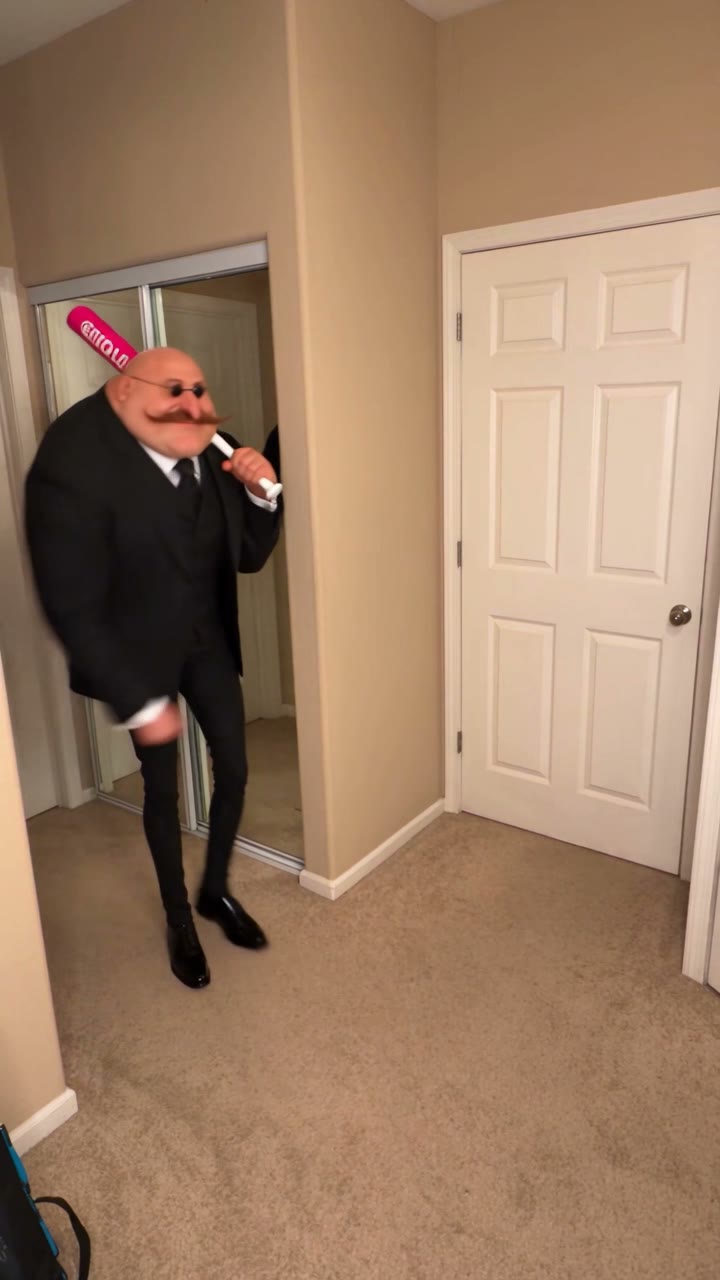

  2. @minicaseoh6741: yellow Russell outfit

    The later post is the supplied motion reference. Its caption mentions Russell, and the dancer wears a yellow scout-style outfit with a cap and badge sash. Sound label: Can I Ride - SIDEPIECE & 95 South. Screenshot snapshot: 1.1M likes, 2,938 comments and 37K saves.

    Read the source

Likes, comments and saves are transcribed from supplied screenshots with unknown capture dates. They are not video views or live totals. Inferred publication dates have not been verified against TikTok metadata. These posts do not establish the first creator or total reach. The preview is a motion reference, not a generated customer example.

Frequently Asked Questions About Can I Ride Dance AI Video Generation

What is the Can I Ride Dance AI generator?

It animates the person in one photo using the supplied Can I Ride hallway dance reference. The result is a 10-second vertical 9:16 MP4. Your photo supplies identity and clothing; the reference supplies the movement sequence and timing.

Do I need to upload a dance video or learn the steps?

No. Upload just one photo. The motion reference is built in, so you do not need to record yourself dancing, set keyframes or align movements on an editing timeline.

Which photo works best for Can I Ride Dance AI?

Use a clear photo of one person with their face and body visible. A full-body photo helps with the footwork, arm gestures and turns. Avoid group shots, heavy occlusion and cropped limbs.

How much does a Can I Ride AI dance video cost?

Each 10-second generation costs 50 credits at 480p or 100 credits at 720p. Both options export a vertical 9:16 MP4 without a watermark.

Does the generated video include the Can I Ride song?

No. Generated videos are silent MP4s with audio generation disabled. The reference preview keeps its original sound, identified in the screenshots as Can I Ride — SIDEPIECE & 95 South. Add an available licensed sound on your publishing platform or in your editor before posting.

Will my photo automatically get the yellow Russell costume?

The photo supplies your dancer's outfit and appearance. The yellow scout-style outfit belongs to the reference performance; this template transfers the dance rather than offering a separate costume-change step. Use a photo of an outfit you want to keep. AI details and motion can vary.

PRICING

Credits for your next video

480p: 50 credits · 720p: 100 · 1080p: 200. Availability varies by template.

50 Credits

USD 4.99

One-time payment

  • 1 Full video (480p)
  • 100% Watermark-free export
  • Credits never expire
  • Commercial use
  • Up to 480p
  • Normal speed

100 Credits

USD 9.99

One-time payment

  • 1 HD video (720p) · or 2 Standard
  • 100% Watermark-free export
  • Credits never expire
  • Commercial use
  • Up to 720p
  • Priority speed
Most Popular

200 Credits

USD 19.99

One-time payment

  • 1 Full HD (1080p) · or 2 HD
  • 100% Watermark-free export
  • Credits never expire
  • Commercial use
  • Up to 1080p
  • Priority speed

400 Credits

USD 34.99

One-time payment

  • 2 Full HD (1080p) · or 4 HD
  • 100% Watermark-free export
  • Credits never expire
  • Commercial use
  • Up to 1080p
  • Priority speed
Best Value

800 Credits

USD 59.99

One-time payment

  • 4 Full HD (1080p) · or 8 HD
  • 100% Watermark-free export
  • Credits never expire
  • Commercial use
  • Up to 1080p
  • Priority speed

1600 Credits

USD 99.99

One-time payment

  • 8 Full HD (1080p) · or 16 HD
  • 100% Watermark-free export
  • Credits never expire
  • Commercial use
  • Up to 1080p
  • Priority speed
SECURE CHECKOUT BY STRIPEINSTANT CREDITS100% WATERMARK-FREE7-DAY REFUND WINDOWFAILED VIDEOS REFUNDED AUTOMATICALLY

Standard, HD, or Full HD: what's the difference?

All options export the complete video with motion animations and sound options. 480p (Standard) costs 50 credits, 720p (HD) costs 100 credits, and 1080p (Full HD) costs 200 credits on supported templates.

OutputResolutionCredits
Full video · Standard480p50 credits
Full video · HD720p100 credits
Full video · Full HD1080p200 credits
Create your video